This is part of my Generative AI in the Classroom series where I write about how AI is changing education and what I have learned from using it. Read the rest of this series here.


In the state of Kentucky, new legislation developed a list of required primary reading sources for all secondary social studies classes. One of the unique additions is Theodore Roosevelt’s New Nationalism speech from 1910. (See the speech here) So, I thought why not take the Conservation section of his speech and make a poster out of it. My problem was the need for graphics in the poster. What I did was create a newspaper style layout in an 11×17 poster template. I made room for three images on the left side of the poster and then generated my first image using the Adobe Firefly AI generator.
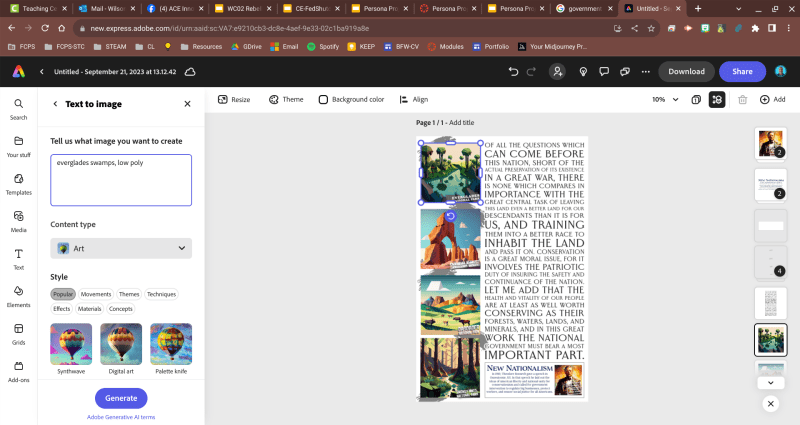
To make sure that they didn’t look like faked photos, I added “low poly” to the end of my prompt. I wanted images that would remind students of famous national parks, look like promo art, but not actually be official images. I copied my first image and pasted it twice more down the column. Then I used the new verticle spacing option after selecting all three. After clicking on each of the other two images, I was able to generate new images using the Image to Text tool and not have to resize them to match the one above. I then added the different naming text boxes on each image. For the speech excerpt, I copied the section from the official White House archives web page (see link above) and then added it to open area on the left side and gave it the Dynamic Text Layout. Since there was too much white space, I added some grey paint stripes from the Elements section and gave the speech text a white outline to make it more readable as an overlay.

The bottom section I used as the title bar and info block for the speech. To see what Firefly would do with a historical figure I typed: “Theodore Roosevelt portrait. Low poly”. It helps the prompt to see periods that way it can separate sections of the prompt for analysis. Two of the looked more like an amalgam of FDR and TR but the one I selected reminded me most of his NYPD police commissioner portrait. Then I started to write a description but wanted to see what Chat GPT would do with the prompt so I asked: “summarize Theodore Roosevelt’s New Nationalism speech.” It did give me the basis for a board explanation but I didn’t like that there was no mention of conservationism, so I added so and asked it to rewrite the prompt. Luckily it caught a spelling error I had as well.

In the end, I was able to take a blank poster template in Adobe Express and generate a primary source document using Generative AI tools for the graphics and rewrites for the summary sections. This could be a great way for students to be able to interact with classroom texts, primary sources, and to should understanding in a different way. 20 years ago I remember using register tape strips and asking students to create a stick man comic for different audiences. This feels like a new way to complete a similar in class task.
Checkout some of my other blog posts.
Creating AI Agents in Google Gemini
This video builds on my presentation at the Innovations For Learning Conference in Lexington on June 4. Be sure to check out all my presentation resources here.


Adobe Report on Creativity with AI 2025
Be sure to read the new Creativity with AI in Education 2025 Report from @adobe. #GenerativeAI is changing the world right now.

Harness Daily AI Image Creation with Adobe Express
Daily practice with @AdobeExpress for AI image generation enhances understanding of technology, refines creative skills, and develops effective prompt engineering, visual themes, and workflows. #AdobeEduCreative

 BFWClassroom
You must be logged in to post a comment.