
Google Notebook LM is 🤯
In the ever-evolving digital landscape of education, new tools constantly emerge to make teaching and learning more efficient and engaging. One such innovation that is making waves is Google’s Notebook LM, a tool that can transform web pages, documents, and even classroom worksheets into audio files. This feature can revolutionize how we deliver content to our students, especially when considering the diverse needs of learners in today’s classrooms.
Turning Worksheets into Podcasts
Imagine taking a standard classroom worksheet—full of questions, readings, or directions—and converting it into a podcast-style audio file. With Google Notebook LM, this is not only possible but can also be a highly effective way to supplement traditional teaching methods. Whether you want to offer alternative ways for students to consume material, or you’re catering to auditory learners, turning text into audio can provide the flexibility needed for diverse learning environments.
However, this is not a simple “read-aloud” of the worksheet. The AI’s advanced processing capabilities mean that it will interpret the content, summarize key points, and reframe the material in ways that may diverge from the literal text of the worksheet. This can be a huge benefit for students who struggle with traditional learning methods, as it allows them to engage with the content in a more conversational and digestible format. But it also introduces a new set of challenges: students won’t be able to passively listen without tuning in carefully to comprehend the material.
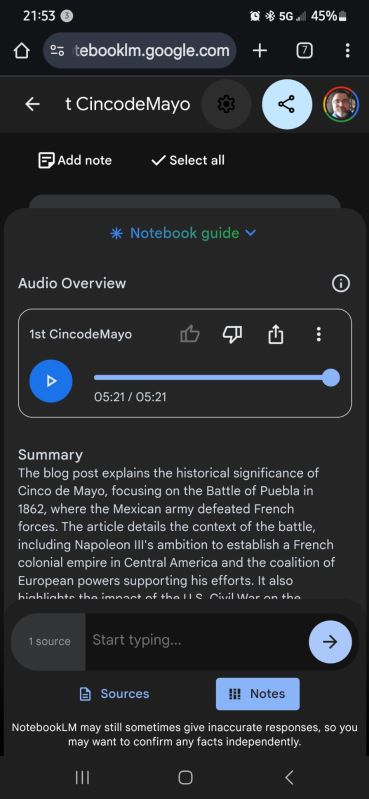
You can check out the notebook I created from my Cinco de Mayo blog here. (Notebook LM LINK) In roughly 10mins I had the link copied, pasted, a Notebook response, podcast and listened to it.
The Importance of Tuning In
Unlike traditional reading where students can re-read sentences or scan the text to find key answers, listening requires active engagement. The audio generated by Google Notebook LM is designed to convey the material in a way that promotes understanding, but it won’t follow the worksheet word for word. Instead, it restructures the information in ways that are more fluid for listening comprehension, focusing on clarity and summary.
This means that students will need to tune in to understand the content. Tuning protocols, such as periodic pauses, reflection moments, and interactive discussions, can help ensure that students are following along. Educators can guide students through how to listen actively, such as teaching them to take notes while listening or encouraging them to ask questions about what they hear. By integrating these protocols into your classroom, you can help students extract the most important information and encourage deeper understanding of the material.
Why This Matters for the Classroom
Using audio files in place of, or as a supplement to, traditional worksheets provides multiple benefits:
- Accessibility: For students with reading difficulties, audio versions can be a game-changer. It allows them to receive the same content in a format that caters to their strengths.
- Engagement: Turning lessons into podcasts can make content feel more dynamic. Students can listen while on the go or during quieter moments, allowing learning to extend beyond the classroom.
- Differentiation: This tool offers teachers a way to differentiate instruction, allowing for personalized learning without drastically changing the material for different learners.
Integrating Google Notebook LM into Your Teaching
To begin using Google Notebook LM in the classroom, consider the following steps:
- Select the Right Worksheets: Start with worksheets that are rich in content, like reading passages or study guides. Worksheets with simple “fill-in-the-blank” questions may not be as useful in audio format.
- Create Podcasts with a Purpose: Use the audio feature to highlight the main ideas, key vocabulary, or essential questions of the worksheet. Ensure that students understand this won’t simply be a narration of the worksheet, but a learning tool designed to help them understand the material more deeply.
- Teach Listening Strategies: Prepare your students for active listening by discussing how they should take notes, ask questions, and pause the audio when necessary. This ensures that they’re engaging with the material, not just passively consuming it.
- Follow Up: After students listen to the podcast, hold a class discussion or assign follow-up activities that require them to apply what they learned from the audio. This reinforces the content and ensures they grasp the material.
What’s Next?
Incorporating audio files into your classroom with Google Notebook LM opens new doors for learning. Whether for students who need differentiated instruction or as an engaging supplement for all learners, the ability to turn worksheets into podcasts makes learning more accessible and dynamic. Just remember: students will need to actively listen and engage with these audio files to fully understand the content, making tuning protocols an essential part of the process.
By thoughtfully integrating this technology, you can enhance your classroom’s accessibility and engagement, and help students master content in new, innovative ways.
I highly recommend listening to this conversation on the NYTimes Podcast Hardfork from Sept 29. They interview Steven Johnson, Steven Johnson, a writer and editorial director at Google Labs, about how/why Notebook LM was created.
This is part of my Generative AI in the Classroom series where I write about how AI is changing education and what I have learned from using it. Read the rest of this series here.

 BFWClassroom
You must be logged in to post a comment.