
If you have been a Rocketbook user for any length of time, you already understand the appeal: write on a reusable notebook, photograph the page through the app, and watch your notes land in Google Drive or Dropbox within seconds. It was a genuinely clever bridge between the tactile pleasure of handwriting and the organizational convenience of cloud storage. For a lot of teachers, especially those of us who think better with a pen in hand, it filled a real gap.
But the landscape shifted recently; and if you haven’t been paying attention to edtech acquisition news, here’s the short version.
What Happened to Rocketbook
Rocketbook was acquired by BIC — yes, the pen company — back in 2020 for $40 million. The hope was that BIC’s global retail reach would expand Rocketbook’s audience. For a while, it seemed to be working; the product stayed on shelves, the app kept functioning, and the reusable notebook concept kept picking up fans in schools and offices.
Then, in early 2026, BIC announced it was discontinuing the Rocketbook line as part of a broader strategic restructuring. The brand didn’t disappear entirely: Global Printing and Packaging (GPP), the Massachusetts-based manufacturer that had actually been producing Rocketbook products all along, stepped in and acquired the product line. GPP knows how to make the notebooks. They know how to distribute them. What they are not, however, is a technology company with a development roadmap for AI-integrated smart-capture features.
The app will almost certainly keep functioning in its current form. But meaningful innovation — the kind that would make Rocketbook genuinely competitive with what AI tools can already do today — seems unlikely under this ownership structure.
Here’s the thing, though: this is actually good news for educators who are willing to adjust their workflow slightly.
The Better Workflow Was Already in Your Pocket
The core function Rocketbook performed — photograph handwritten content, route it somewhere useful — doesn’t require a proprietary app. It requires a camera and an AI assistant. Most of us have both.
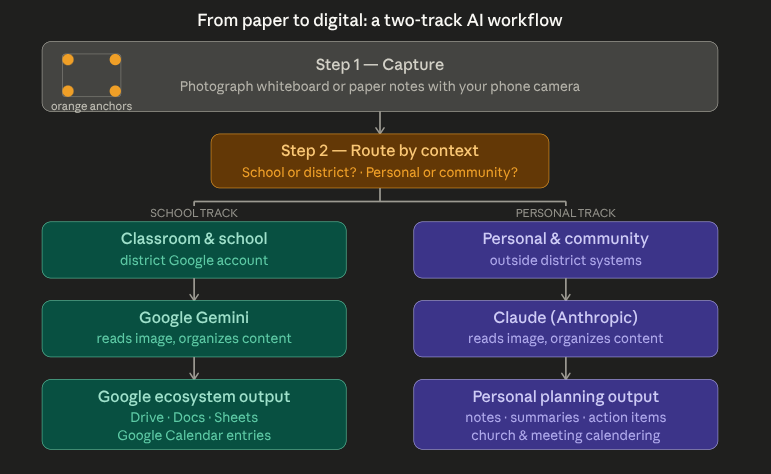
For teachers who use color-anchor markers on whiteboards (the orange dots in the corners that told the Rocketbook app where to crop a photo), those same markers still work perfectly as framing guides when you photograph a whiteboard with your regular camera app. The visual discipline of placing those anchors was always the useful habit; the app was just the routing mechanism. You can replace the routing mechanism without losing the habit.
Once you have a clean photo of your whiteboard, your notes, or a page of student work, the process is straightforward: send the image to an AI assistant, prompt it to read, organize, and format the content, and then direct the output wherever you need it.
The Two-Track Model: Gemini for School, Claude for Personal
Where this gets genuinely practical for classroom educators is in separating the workflow by context. Not all notes belong in the same place, and not all planning should run through district systems.
Here is how I have structured it for my own practice:
School and classroom notes — whiteboard captures after a lesson, faculty meeting jottings, curriculum planning session summaries — route through Google Gemini. My district uses Google Workspace, so Gemini integrates naturally with Drive, Docs, and Google Calendar. A photo of a whiteboard planning session can become a formatted Google Doc task list in about thirty seconds; a meeting’s worth of handwritten notes can become a calendar event with attached action items almost as quickly. Everything stays in the district ecosystem, which matters for data compliance and for keeping professional materials where colleagues can access them.
Personal and community notes — church committee meetings, independent professional development planning, notes from conferences or advocacy work that I’ll later need to turn into calendar entries or personal planning documents — route through Claude. This keeps that content appropriately separate from district systems while still giving me the organizing power of a capable AI assistant. Claude handles long-form reorganization particularly well; if I have two pages of handwritten notes from a planning meeting and I need them sorted into action items, reference information, and follow-up questions, the output is clean and usable.
The two-track model isn’t complicated. It’s really just a routing decision you make at the moment you take the photo: is this school, or is this personal? From there, the AI does the heavy lifting.
What You Need to Get Started
The barrier to entry here is lower than you might expect. You don’t need new hardware, a new subscription, or a new notebook. If you already have a smartphone and access to Gemini through your district Google account (most Kentucky districts do), you can start today.
A few practical notes for making this work well:
Keep your framing discipline. Whether you use orange anchor dots, colored tape corners, or just a clean whiteboard frame, consistent framing makes the photo easier for the AI to read. Good lighting matters too; natural light or a well-lit classroom is almost always sufficient.
Prompt specifically. “Organize these notes” gives you a decent result. “Read these whiteboard notes, separate the key terms from the discussion questions, and format the output as a two-column table I can paste into a Google Doc” gives you something immediately usable. The more specific your prompt, the less editing you do afterward.
Build the habit before you optimize. Don’t spend a week designing the perfect prompt template before you’ve taken ten photos. Take the photos first, experiment with prompting, and let the workflow shape itself around what you actually need.
The Bigger Picture
There is a reasonable argument that educators shouldn’t have to think about any of this — that smart-capture tools should just work, seamlessly, without requiring us to understand acquisition histories or build custom AI workflows. That argument isn’t wrong.
But the tools we were relying on to handle this invisibly are now in uncertain hands; and the tools that can replace them are already embedded in our daily practice. Google Gemini is in our district accounts. Claude is available through a browser. The camera we already carry is more capable than any dedicated scanning app. The workflow I’m describing isn’t a workaround; it’s an upgrade, built from things most of us already have.
The Rocketbook chapter isn’t over for everyone. If you use the notebooks, they’ll keep being made and sold. But for the smart-capture workflow that most of us actually depended on, the better path forward runs through the AI tools that are already part of how we work.
The orange dots still go in the corners. The camera still does the capturing. The rest just got smarter.
This is part of my AI in the Classroom series where I write about how AI is changing education and what I have learned from using it. Read the rest of this series here.


You must be logged in to post a comment.