This was originally posted in 2011 to accompany my presentation session at the National Association of Laboratory Schools. I have updated it to include new links and connections with other blogger educators that I admire.
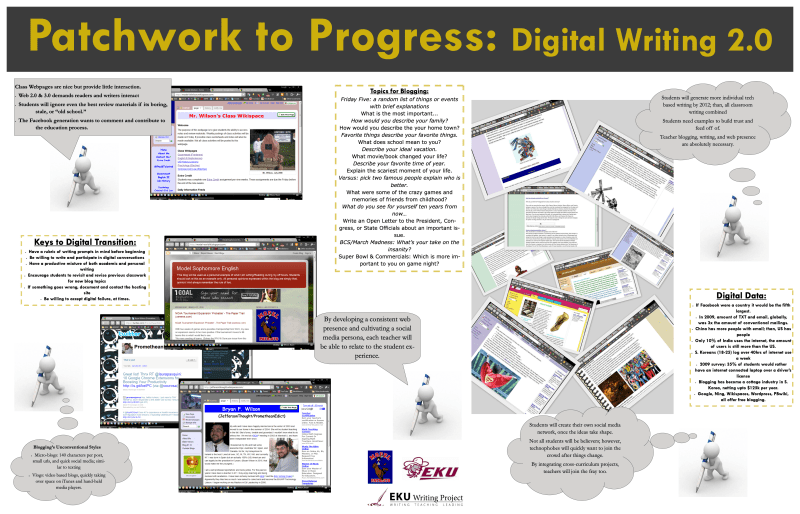
Poster
Building your blog from the ground up can be a long and difficult process. For teachers, it can also mean building a lifelong tool used for years by fellow educators, students, and their families. The idea of social media is not going to leave the classroom; however, it can be leveraged to amplify and focus a teacher’s purpose. Thus, using blogs as a literacy tool is both a proper approach and a long-term commitment to the betterment of students and the educator.
March 2023 will mark the fifteenth anniversary of my first blog post. I remember writing that piece in my classroom and thinking that I should say something not too provocative but very interesting and conveys my interest in the idea of standardized testing. Little did I know then, that I would push outwards and develop my own voice and yearning to be a teacher/blogger. I love to write and to share my writing. As a result, I have just a few friends who read my blog, even fewer comments on Facebook, and even fewer emails about what I write. Since then I have helped teachers and students begin developing a blog of their own. Now, I don’t say this to brag but to simply say, I should be doing more.
Therefore, I am going to lay down the how-to on building and maintaining a student blogging classroom.
- Branding: One picture or drawing that you use for all of your classroom-based digital media sites. Additionally, unify your name across all platforms. I have gone far enough to purchase my blog domain and use it for my Threads, Twitter, Instagram, and bit.ly Links
- Connectivity: It took me a long time to begin connecting Twitter, Facebook, LinkedIn, and blog personas together. Now they are self-promoting and semi-seamless. Currently, when I post on my WordPress blog it sends promo links out to my social media feeds. It’s not perfect but you can purchase social media management services if you want to but I don’t recommend the additional costs.
- Social Media: It is your friend and enemy. Be sure to create a personal page, lock it down from students, and maintain it regularly. I’ve read about too many horror stories of teachers getting blindsided by fake pages that students and/or parents made. On the other side of this coin, if you want to connect with the student on social media, don’t! Most communication with student has to be through approved school and district channels. Always follow AUP guidelines
- Blogs Visually: It should be simple and serve its purpose. If you are just posting notes, syllabus, and worksheets, then be sure to make a blog post for the unit and include hyperlinks to find the materials. The average person only goes two clicks deep into a website.
- Posting Legalities: Remember you teach students who are more-than-likely minors. Do not post pictures of them in their nifty little extra credit outfits without parental consent. Additionally, if you have parental consent, keep it on file and email parents when you post the pictures so that they know. Make sure that your blog meets with school and/or district AUP guidelines and recommendations.
- Self-promotion: This may sound trite but if you follow a blogger tell them why in their comment feed. Post trackbacks to their work and use them as examples in your classroom. This will get traffic from outside your classroom to your site. Also, be mindful of district policies relating to self-publishing and promotion.
- Student blogs: Reminder Minors at work. If you use an open network blogging service, anything that your district doesn’t provide or monitor, you better have a good reason and lots of AUP and Permission forms. Also, subscribe to an RSS Feed service to read the student posts. It takes time to set up but makes for easy access later on.
- Reflection: Follow-up on student writing. It is one thing to read a student blog for grading, it is another to find a student’s blog published as a local op-ed piece. Comments and positive feedback are huge catalysts for a student to continue writing.
- Personal vs. Professional: As a teacher, I have two blogs that I maintain. One is my personal blog which contains content feeds of commentaries, personal writings, interests, political views, and personal events. The other is my classroom blog where I write about two things only: class and perspectives on current events for class activities. I try to be unbiased and leave all student information out of the classroom blog. If I ever write about a student, it is about achievement only and is usually public knowledge at the time of the posting.
- Creative Commons Copyright Portal: Provides a copyright generator for your webpage.
Writers and Leaders That I Follow
Marty Park: Cheif Digital Officer For the Ky Department of Education
STLP Kentucky: The best place to find rubrics for digital writing activities that are STEM-focused and based on ISTE Standards
Troy Hicks: professor of English and education at Central Michigan University and focuses his work on the teaching of writing, the intersections of literacy and technology, and, more broadly, teacher education and professional development.
Bud Hunt: WordPress Page National Writing Project Alum and advocate for libraries and writing across the curriculum for all grades
Matt Miller: Ditch That Textbook Has some great digital classroom ideas to help develop blogging in your classroom beyond conventional writing.
Blogging Topics List for classes I have taught over the years. (List)
Goodreads: Online reading community designed to connect readers, writers, and reviews. (my profile)

This work is licensed under a Creative Commons Attribution-NonCommercial-ShareAlike 4.0 International License.

 BFWClassroom
You must be logged in to post a comment.